StanfordCS101: Digital Images Lecture 4
Digital Images
In this section we'll look at how digital images work.
Digital Images
You see images on computers all the time. Here we will look behind the curtain, seeing how images are put together. What looks like a whole image to us, in the computer is a structure made of many little numbers.
Here is an image of some yellow flowers: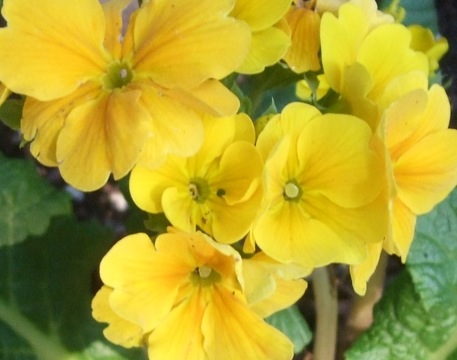
Zoom In - Pixels
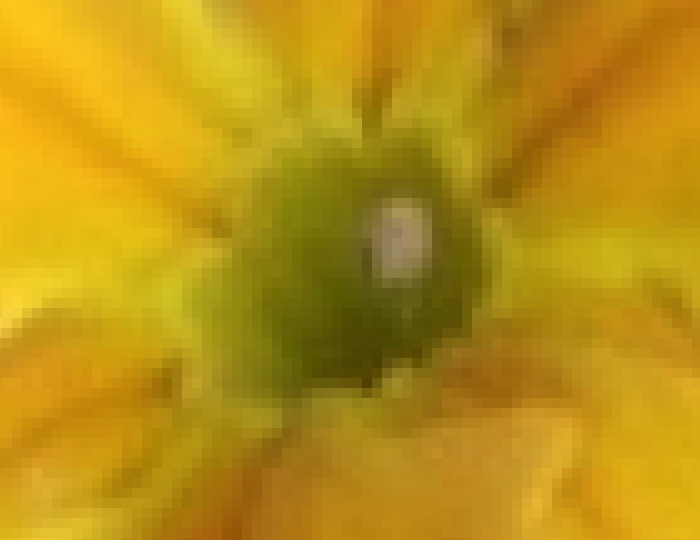
Zooming in on the upper left flower, we can see that it is actually made of many square "pixels", each showing one color.
- Each pixel is a small square that shows a single color
- An 800 x 600 image is 800 pixels wide by 600 pixels high, 480,000 pixels in all (0.5 megapixels)
- Digital cameras today produce images with several megapixels per image, say 8000 x 6000 for about 5 megapixels
We will not work with individual x/y coordinates too much. You just need to appreciate that there is this x/y coordinate system, so that every pixel in an image has some x/y coordinate that identifies its location within the image grid.
Image Diagram
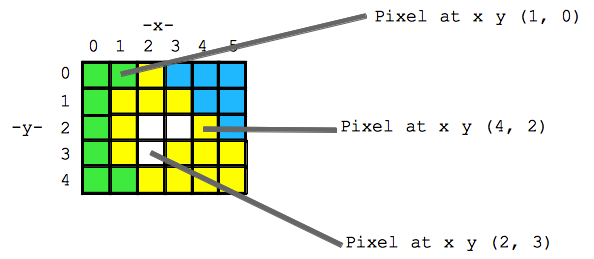
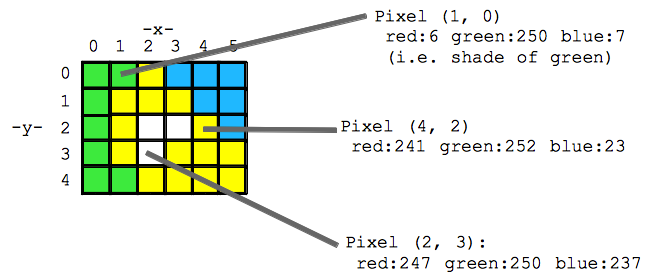
- The pixels are organized as a grid, identifying each by an (x, y) coordinate, so every pixel can be identified by its (x, y) address
- x=0, y=0 is the upper left -- aka (0, 0) the top left pixel of the whole image
- x=1, y=0 is the pixel 1 to the right -- aka (1, 0)
- x=2, y=0 is the pixel 1 more to the right -- aka (2, 0) -- still in the top row
- How is the color of each pixel encoded?
Aside - Newton's Color Prism
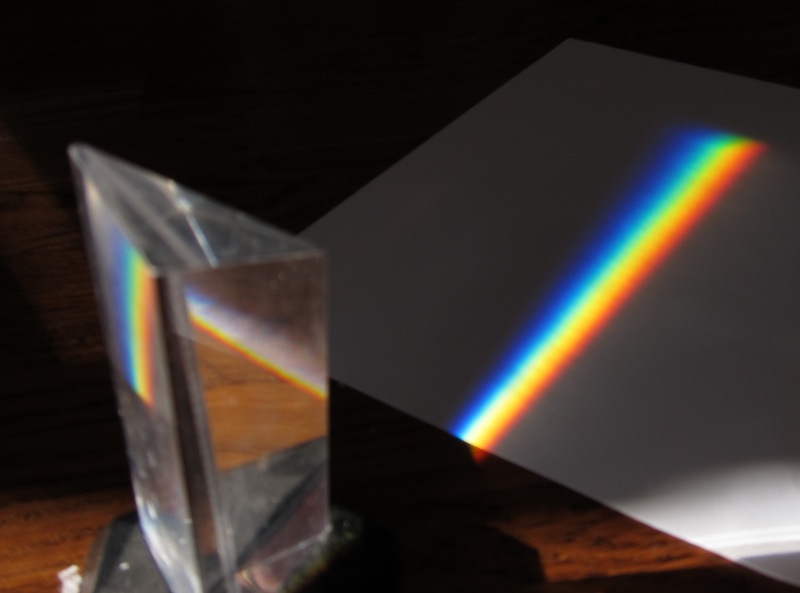
Sir Isaac Newton did the famous prism experiment, showing that white light is made up of a spectrum pure colored light. Here is a picture of the experiment on my floor. White sunlight is coming in from the left into the glass triangular prism which splits up the light. Coming out of the prism we have a continuous range of pure colors, and a few are picked out by name: red, orange, yellow, green, blue, indigo, violet (ROY G BIV).
Funny story: why add "indigo" in there, instead of just leave it at blue? Reflecting the mysticism of his time, Newton felt the number of colors should match the number of planets, which at the time was seven.
RGB Color Scheme - Red Green Blue
How to represent the color of a pixel? The red/green/blue (RGB) scheme is one popular way of representing a color in the computer. In RGB, every color is defined as a particular combination of pure red, green, and blue light.
RGB Explorer
The best way to see how RGB works is to just play with. This RGB Explorer page which shows how any color can be made by combining red, green, and blue light.
RGB - Three Numbers
So essentially, any color can be encoded as three numbers .. one each for red, green, and blue.
| Color | Red number | Green number | Blue number |
|---|---|---|---|
| red | 255 | 0 | 0 |
| purple | 255 | 0 | 255 |
| dark yellow | 100 | 100 | 0 |
| white | 255 | 255 | 255 |
| black | 0 | 0 | 0 |
In RGB, a color is defined as a mixture of pure red, green, and blue lights of various strengths. Each of the red, green and blue light levels is encoded as a number in the range 0..255, with 0 meaning zero light and 255 meaning maximum light.
So for example (red=255, green=100, blue=0) is a color where red is maximum, green is medium, and blue is not present at all, resulting in a shade of orange. In this way, specifying the brightness 0..255 for the red, blue, and green color components of the pixel, any color can be formed.
Pigment Note -- you may have mixed color paints, such as adding red and green paint together. That sort of "pigment" color mixing works totally differently from the "light" mixing we have here. Light mixing is, I think, easier to follow, and in any case, is the most common way that computers store and manipulate images.
It's not required that you have an intuition about, say, what blue=137 looks like. You just need to understand that any color can be made by combining the three color values.
Image Diagram with RGB
Theme: Digital Atomization
We started with a whole image, and reduced it to a big collection of small elements. This a common theme in computer science -- what looks like an organic complicated whole, is "atomized" in the computer ... made up of a very large collection of very simple elements.
So we can start with a whole, textured digital image of something. Then break it down into small square pixels. Then each pixel breaks down to 3 numbers in the range 0..255. This is a typical computer pattern -- something whole and organic is, if you look behind the scenes, is broken down and represented as a lot of little numbers.
Comments
Post a Comment